Best All in One AI Image Platform for Marketers and Creators
Finding the right AI image platform is not about chasing trends. It is about building a workflow that saves time, keeps branding consistent, and helps you create assets that are ready to publish. I look at AI image tools from a production angle first. If a platform creates strong images but slows down editing, revisions, exports, or campaign consistency, it creates extra work instead of solving problems.
That is why platforms like GPT Image 2 are getting attention from creators, ecommerce brands, agencies, and marketing teams that need repeatable workflows instead of disconnected tools. A strong AI image platform should help you move from concept to final asset in one place without rebuilding the process every time you start a new campaign.
Why Most AI Image Workflows Break Down
A lot of AI image tools are built around single outputs. You generate one image, download it, move into another editor, then switch to another tool for mockups, effects, resizing, or revisions. That process becomes difficult once you start producing content at scale.
I usually recommend looking for these features first:
- Reference image support
- Image-to-image editing
- Background cleanup
- Product mockup generation
- Export-ready assets
- Consistent visual style controls
- Multiple generation models
- Browser-based workflow management
Without those features, creative work turns into constant file juggling.
For content creators and agencies, that lost time adds up quickly.
What Makes a Strong GPT Image Generator
The best GPT image generator should give you control, not randomness.
Many platforms can create impressive visuals from prompts, but consistency matters more if you are building ads, ecommerce listings, product launches, or social media campaigns.
imggpt focuses heavily on structured workflows. Their system supports prompt-based image generation while also allowing users to upload references for composition, lighting, mood, product positioning, and character consistency. That matters because most marketing teams need campaigns to feel connected across dozens of assets.
Instead of relying only on text prompts, users can guide outputs visually.
That is a major advantage for:
- Ecommerce brands
- Creative agencies
- Social media teams
- Product marketers
- Designers managing campaign consistency
Why AI Photo Editing Matters as Much as Generation
A strong AI image generator is only half the process.
Most teams still need to refine outputs before publishing. That is where AI photo editing becomes important.
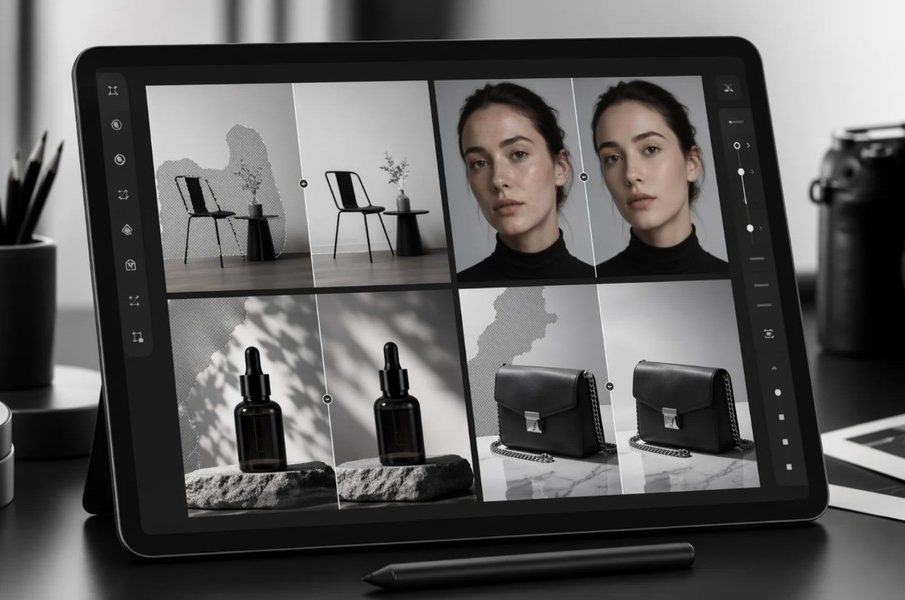
imggpt includes editing tools for:
- Background cleanup
- Object removal
- Product photo enhancement
- Portrait retouching
- Distraction removal
- Image refinement
I think this matters because many AI platforms still force users into external editing software after generation. That creates delays and inconsistent workflows.
Having editing built directly into the same browser workspace simplifies production.
For ecommerce brands especially, this becomes useful during product launches where multiple asset versions need quick revisions before publishing.
AI Image Generators for Ecommerce Brands
Ecommerce content production never really stops.
Brands constantly need:
- Product mockups
- Lifestyle scenes
- Promotional graphics
- Launch visuals
- Catalog imagery
- Social ads
- Landing page visuals
Creating all of that manually takes time and usually requires multiple tools.
imggpt supports ecommerce-focused workflows by allowing teams to generate campaigns from a single source image while creating multiple visual variations for different platforms and ad placements.
That helps maintain consistency across:
- Product pages
- Instagram ads
- Meta campaigns
- TikTok content
- Email graphics
- Presentation decks
The reference-based workflow is especially useful for product consistency. Brands can maintain similar lighting, framing, and style across an entire campaign instead of starting from scratch every time.
Why Agencies Need All-in-One AI Image Platforms
Agencies usually manage multiple brands at once. That creates pressure around speed, revisions, and visual consistency.
A disconnected workflow slows down approvals and client feedback cycles.
I usually suggest agencies look for platforms that support:
- Multiple visual styles
- Fast revisions
- Model flexibility
- Export-ready production
- Team-friendly workflows
- Repeatable creative systems
imggpt supports several leading image and video generation models including Seedance, Seedream, Veo, Wan, Grok, Kling, Nano Banana, and Flux.
That flexibility matters because different campaigns require different visual styles.
One model may work better for product scenes while another works better for portraits, editorial graphics, or cinematic ad visuals.
Instead of forcing users into one style system, the platform allows teams to compare outputs and refine selected assets directly inside the workflow.
AI Image Tools for Social Media and Ads
Social media content moves fast.
Teams need high output volume while still keeping visuals polished and recognizable.
The best AI image workflow platforms support quick production cycles without lowering quality.
imggpt includes one-click effects and style variations that help creators test multiple campaign directions quickly. That can help teams create:
- Grayscale concepts
- Poster-style graphics
- Editorial treatments
- Lifestyle scenes
- Branded ad visuals
- Creative testing assets
For paid advertising, rapid testing matters. Marketing teams often need several visual variations before identifying high-performing creative.
A workflow that combines generation, refinement, editing, and export inside one workspace reduces delays during campaign production.
Why Reference-Based AI Generation Is Becoming Essential
Reference-based workflows are becoming one of the most important parts of AI image production.
Prompt-only generation often creates inconsistency between outputs. That becomes a problem when brands need recognizable campaigns.
Reference uploads give users better control over:
- Product positioning
- Composition
- Character appearance
- Mood
- Lighting
- Brand style
- Color consistency
That makes AI image generation much more practical for long-term production work.
I think this is one of the biggest differences between casual AI image tools and platforms designed for real production workflows.
Choosing the Right AI Creative Workflow Software
The best AI creative workflow software should reduce friction across the entire production process.
You should not need separate platforms for:
That is where imggpt stands out. Their platform is structured around a complete browser-based workflow instead of isolated image generation.
For creators, agencies, ecommerce brands, and marketing teams, that type of system helps create repeatable production pipelines instead of one-off experiments.
The strongest AI image platforms are not necessarily the ones with the flashiest outputs. They are the platforms that help teams consistently create publish-ready assets with fewer delays, fewer tool switches, and better creative control.